

|
Main Page Class Hierarchy Alphabetical List Compound List File List Compound Members
|
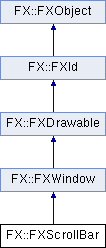
The scroll bar is used when a document has a larger content than may be made visible. More...
#include <FXScrollBar.h>
Public Types | |
| enum | { ID_AUTOSCROLL =FXWindow::ID_LAST, ID_TIMEWHEEL, ID_LAST } |
 Public Types inherited from FX::FXWindow Public Types inherited from FX::FXWindow | |
| enum | WindowClass { ClassNormal, ClassGraphic, ClassSpecial, ClassRoot, ClassShell, ClassPopup, ClassToolTip, ClassMain, ClassDialog, ClassToolBar, ClassSplash, ClassNotify, ClassPanel, ClassDesktop } |
| Window classes. More... | |
| enum | { ID_NONE, ID_HIDE, ID_SHOW, ID_TOGGLESHOWN, ID_LOWER, ID_RAISE, ID_DELETE, ID_DISABLE, ID_ENABLE, ID_TOGGLEENABLED, ID_UNCHECK, ID_CHECK, ID_UNKNOWN, ID_UPDATE, ID_TIPTIMER, ID_SETVALUE, ID_SETINTVALUE, ID_SETLONGVALUE, ID_SETREALVALUE, ID_SETSTRINGVALUE, ID_SETICONVALUE, ID_SETINTRANGE, ID_SETREALRANGE, ID_GETINTVALUE, ID_GETLONGVALUE, ID_GETREALVALUE, ID_GETSTRINGVALUE, ID_GETICONVALUE, ID_GETINTRANGE, ID_GETREALRANGE, ID_SETHELPSTRING, ID_GETHELPSTRING, ID_SETTIPSTRING, ID_GETTIPSTRING, ID_QUERY_MENU, ID_HOTKEY, ID_ACCEL, ID_UNPOST, ID_POST, ID_MDI_TILEHORIZONTAL, ID_MDI_TILEVERTICAL, ID_MDI_CASCADE, ID_MDI_MAXIMIZE, ID_MDI_MINIMIZE, ID_MDI_RESTORE, ID_MDI_CLOSE, ID_MDI_WINDOW, ID_MDI_MENUWINDOW, ID_MDI_MENUMINIMIZE, ID_MDI_MENURESTORE, ID_MDI_MENUCLOSE, ID_MDI_NEXT, ID_MDI_PREV, ID_LAST } |
Public Member Functions | |
| long | onPaint (FXObject *, FXSelector, void *) |
| long | onMotion (FXObject *, FXSelector, void *) |
| long | onMouseWheel (FXObject *, FXSelector, void *) |
| long | onLeftBtnPress (FXObject *, FXSelector, void *) |
| long | onLeftBtnRelease (FXObject *, FXSelector, void *) |
| long | onMiddleBtnPress (FXObject *, FXSelector, void *) |
| long | onMiddleBtnRelease (FXObject *, FXSelector, void *) |
| long | onRightBtnPress (FXObject *, FXSelector, void *) |
| long | onRightBtnRelease (FXObject *, FXSelector, void *) |
| long | onUngrabbed (FXObject *, FXSelector, void *) |
| long | onTimeWheel (FXObject *, FXSelector, void *) |
| long | onAutoScroll (FXObject *, FXSelector, void *) |
| long | onCmdSetValue (FXObject *, FXSelector, void *) |
| long | onCmdSetIntValue (FXObject *, FXSelector, void *) |
| long | onCmdGetIntValue (FXObject *, FXSelector, void *) |
| long | onCmdSetLongValue (FXObject *, FXSelector, void *) |
| long | onCmdGetLongValue (FXObject *, FXSelector, void *) |
| long | onCmdSetIntRange (FXObject *, FXSelector, void *) |
| long | onCmdGetIntRange (FXObject *, FXSelector, void *) |
| FXScrollBar (FXComposite *p, FXObject *tgt=nullptr, FXSelector sel=0, FXuint opts=SCROLLBAR_VERTICAL, FXint x=0, FXint y=0, FXint w=0, FXint h=0) | |
| Construct scroll bar. | |
| virtual FXint | getDefaultWidth () override |
| Return default width. | |
| virtual FXint | getDefaultHeight () override |
| Return default height. | |
| virtual void | layout () override |
| Perform layout. | |
| void | setRange (FXint r, FXbool notify=false) |
| Set content size range. More... | |
| FXint | getRange () const |
| Return content size range. | |
| void | setPage (FXint p, FXbool notify=false) |
| Set the viewable page size. More... | |
| FXint | getPage () const |
| Return viewable page size. | |
| void | setPosition (FXint p, FXbool notify=false) |
| Change scroll position. More... | |
| FXint | getPosition () const |
| Return current scroll position. | |
| void | setLine (FXint l) |
| Set scoll increment for line. | |
| FXint | getLine () const |
| Return line increment. | |
| void | setWheelLines (FXint lines) |
| Change mouse wheel scroll lines. | |
| FXint | getWheelLines () const |
| Return current wheel lines. | |
| void | setHiliteColor (FXColor clr) |
| Change highlight color. | |
| FXColor | getHiliteColor () const |
| Return highlight color. | |
| void | setShadowColor (FXColor clr) |
| Change the shadow color. | |
| FXColor | getShadowColor () const |
| Return the shadow color. | |
| void | setBorderColor (FXColor clr) |
| Change the border color. | |
| FXColor | getBorderColor () const |
| Return the border color. | |
| void | setArrowColor (FXColor clr) |
| Change the arrow color. | |
| FXColor | getArrowColor () const |
| Return the arrow color. | |
| void | setScrollBarStyle (FXuint style) |
| Change the scrollbar style. | |
| FXuint | getScrollBarStyle () const |
| Return the scrollbar style. | |
| void | setBarSize (FXint size) |
| Change the bar size. | |
| FXint | getBarSize () const |
| Return the bar size. | |
| virtual void | save (FXStream &store) const override |
| Save to stream. | |
| virtual void | load (FXStream &store) override |
| Load from stream. | |
| virtual | ~FXScrollBar () |
| Destructor. | |
| Public Member Functions inherited from FX::FXWindow | |
| long | onPaint (FXObject *, FXSelector, void *) |
| long | onMap (FXObject *, FXSelector, void *) |
| long | onUnmap (FXObject *, FXSelector, void *) |
| long | onConfigure (FXObject *, FXSelector, void *) |
| long | onUpdate (FXObject *, FXSelector, void *) |
| long | onMotion (FXObject *, FXSelector, void *) |
| long | onMouseWheel (FXObject *, FXSelector, void *) |
| long | onEnter (FXObject *, FXSelector, void *) |
| long | onLeave (FXObject *, FXSelector, void *) |
| long | onLeftBtnPress (FXObject *, FXSelector, void *) |
| long | onLeftBtnRelease (FXObject *, FXSelector, void *) |
| long | onMiddleBtnPress (FXObject *, FXSelector, void *) |
| long | onMiddleBtnRelease (FXObject *, FXSelector, void *) |
| long | onRightBtnPress (FXObject *, FXSelector, void *) |
| long | onRightBtnRelease (FXObject *, FXSelector, void *) |
| long | onSpaceBallMotion (FXObject *, FXSelector, void *) |
| long | onSpaceBallButtonPress (FXObject *, FXSelector, void *) |
| long | onSpaceBallButtonRelease (FXObject *, FXSelector, void *) |
| long | onBeginDrag (FXObject *, FXSelector, void *) |
| long | onEndDrag (FXObject *, FXSelector, void *) |
| long | onDragged (FXObject *, FXSelector, void *) |
| long | onKeyPress (FXObject *, FXSelector, void *) |
| long | onKeyRelease (FXObject *, FXSelector, void *) |
| long | onUngrabbed (FXObject *, FXSelector, void *) |
| long | onDestroy (FXObject *, FXSelector, void *) |
| long | onFocusSelf (FXObject *, FXSelector, void *) |
| long | onFocusIn (FXObject *, FXSelector, void *) |
| long | onFocusOut (FXObject *, FXSelector, void *) |
| long | onSelectionLost (FXObject *, FXSelector, void *) |
| long | onSelectionGained (FXObject *, FXSelector, void *) |
| long | onSelectionRequest (FXObject *, FXSelector, void *) |
| long | onClipboardLost (FXObject *, FXSelector, void *) |
| long | onClipboardGained (FXObject *, FXSelector, void *) |
| long | onClipboardRequest (FXObject *, FXSelector, void *) |
| long | onDNDEnter (FXObject *, FXSelector, void *) |
| long | onDNDLeave (FXObject *, FXSelector, void *) |
| long | onDNDMotion (FXObject *, FXSelector, void *) |
| long | onDNDDrop (FXObject *, FXSelector, void *) |
| long | onDNDRequest (FXObject *, FXSelector, void *) |
| long | onQueryHelp (FXObject *, FXSelector, void *) |
| long | onQueryTip (FXObject *, FXSelector, void *) |
| long | onCmdShow (FXObject *, FXSelector, void *) |
| long | onCmdHide (FXObject *, FXSelector, void *) |
| long | onUpdToggleShown (FXObject *, FXSelector, void *) |
| long | onCmdToggleShown (FXObject *, FXSelector, void *) |
| long | onCmdRaise (FXObject *, FXSelector, void *) |
| long | onCmdLower (FXObject *, FXSelector, void *) |
| long | onCmdEnable (FXObject *, FXSelector, void *) |
| long | onCmdDisable (FXObject *, FXSelector, void *) |
| long | onUpdToggleEnabled (FXObject *, FXSelector, void *) |
| long | onCmdToggleEnabled (FXObject *, FXSelector, void *) |
| long | onCmdUpdate (FXObject *, FXSelector, void *) |
| long | onUpdYes (FXObject *, FXSelector, void *) |
| long | onCmdDelete (FXObject *, FXSelector, void *) |
| FXWindow (FXComposite *p, FXuint opts=0, FXint x=0, FXint y=0, FXint w=0, FXint h=0) | |
| Constructor. | |
| FXWindow * | getParent () const |
| Return a pointer to the parent window. | |
| FXWindow * | getOwner () const |
| Return a pointer to the owner window. | |
| FXWindow * | getNext () const |
| Return a pointer to the next (sibling) window, if any. | |
| FXWindow * | getPrev () const |
| Return a pointer to the previous (sibling) window , if any. | |
| FXWindow * | getFirst () const |
| Return a pointer to this window's first child window , if any. | |
| FXWindow * | getLast () const |
| Return a pointer to this window's last child window, if any. | |
| FXWindow * | getFocus () const |
| Return a pointer to the currently focused child window. | |
| FXWindow * | getShell () const |
| Return a pointer to the shell window. | |
| FXWindow * | getRoot () const |
| Return a pointer to the root window. | |
| virtual WindowClass | getWindowClass () const |
| Get window class. | |
| void | setKey (FXuint k) |
| Change window key. | |
| FXuint | getKey () const |
| Return window key. | |
| FXWindow * | getChildWithKey (FXuint k) const |
| Return child window with given window key. | |
| void | setTarget (FXObject *t) |
| Set the message target object for this window. | |
| FXObject * | getTarget () const |
| Get the message target object for this window, if any. | |
| void | setSelector (FXSelector sel) |
| Set the message identifier for this window. | |
| FXSelector | getSelector () const |
| Get the message identifier for this window. | |
| FXint | getX () const |
| Get this window's x-coordinate, in the parent's coordinate system. | |
| FXint | getY () const |
| Get this window's y-coordinate, in the parent's coordinate system. | |
| virtual FXint | getWidthForHeight (FXint givenheight) |
| Return width for given height. | |
| virtual FXint | getHeightForWidth (FXint givenwidth) |
| Return height for given width. | |
| void | setX (FXint x) |
| Set this window's x-coordinate, in the parent's coordinate system. | |
| void | setY (FXint y) |
| Set this window's y-coordinate, in the parent's coordinate system. | |
| void | setWidth (FXint w) |
| Set the window width; and flag the widget as being in need of layout by its parent. More... | |
| void | setHeight (FXint h) |
| Set the window height; and flag the widget as being in need of layout by its parent. More... | |
| void | setLayoutHints (FXuint lout) |
| Set layout hints for this window. | |
| FXuint | getLayoutHints () const |
| Get layout hints for this window. | |
| FXAccelTable * | getAccelTable () const |
| Return a pointer to the accelerator table. | |
| void | setAccelTable (FXAccelTable *acceltable) |
| Set the accelerator table. | |
| void | addHotKey (FXHotKey code) |
| Add a hot key. | |
| void | remHotKey (FXHotKey code) |
| Remove a hot key. | |
| void | setHelpTag (const FXString &text) |
| Change help tag for this widget. | |
| const FXString & | getHelpTag () const |
| Get the help tag for this widget. | |
| FXbool | isShell () const |
| Return true if window is a shell window. | |
| FXbool | isOwnerOf (const FXWindow *window) const |
| Return true if specified window is owned by this window. | |
| FXbool | isChildOf (const FXWindow *window) const |
| Return true if specified window is ancestor of this window. | |
| FXbool | containsChild (const FXWindow *child) const |
| Return true if this window contains child in its subtree. | |
| FXWindow * | getChildAt (FXint x, FXint y) const |
| Return the child window at specified coordinates. | |
| FXint | numChildren () const |
| Return the number of child windows for this window. | |
| FXint | indexOfChild (const FXWindow *window) const |
| Return the index (starting from zero) of the specified child window, or -1 if the window is not a child or NULL. | |
| FXWindow * | childAtIndex (FXint index) const |
| Return the child window at specified index, or NULL if the index is negative or out of range. | |
| FXComposeContext * | getComposeContext () const |
| Return compose context. | |
| void | createComposeContext () |
| Create compose context. | |
| void | destroyComposeContext () |
| Destroy compose context. | |
| FXbool | cursorShown () const |
| Is cursor shown. | |
| void | showCursor (FXbool flag=true) |
| Show or hide the cursor. | |
| void | setDefaultCursor (FXCursor *cur) |
| Set the default cursor for this window. | |
| FXCursor * | getDefaultCursor () const |
| Return the default cursor for this window. | |
| void | setDragCursor (FXCursor *cur) |
| Set the drag cursor for this window. | |
| FXCursor * | getDragCursor () const |
| Return the drag cursor for this window. | |
| FXbool | getCursorPosition (FXint &x, FXint &y, FXuint &buttons) const |
| Return the cursor position and mouse button-state. | |
| FXbool | setCursorPosition (FXint x, FXint y) |
| Warp the cursor to the new position. | |
| FXbool | isActive () const |
| Return true if the window is active. | |
| virtual FXbool | canFocus () const |
| Return true if this window is a control capable of receiving the focus. | |
| FXbool | hasFocus () const |
| Return true if this window has the focus. | |
| FXbool | inFocusChain () const |
| Return true if this window is in focus chain. | |
| virtual void | setFocus () |
| Move the focus to this window. | |
| virtual void | killFocus () |
| Remove the focus from this window. | |
| FXbool | isDefault () const |
| Return true if this is the default window. | |
| virtual void | setDefault (FXuchar flag=true) |
| This changes the default window which responds to the Return key in a dialog. More... | |
| FXWindow * | findDefault () const |
| Find default window among this window's children. | |
| FXbool | isInitial () const |
| Return true if this is the initial default window. | |
| void | setInitial (FXbool flag=true) |
| Make this window the initial default window. | |
| FXWindow * | findInitial () const |
| Find inital default window among this window's children. | |
| FXbool | isEnabled () const |
| Return true if this window is able to receive mouse and keyboard events. | |
| virtual void | enable () |
| Enable the window to receive mouse and keyboard events. | |
| virtual void | disable () |
| Disable the window from receiving mouse and keyboard events. | |
| virtual void | create () override |
| Create all of the server-side resources for this window. | |
| virtual void | attach (FXID w) |
| Attach foreign window handle to this window. | |
| virtual void | detach () override |
| Detach the server-side resources for this window. | |
| virtual void | destroy () override |
| Destroy the server-side resources for this window. | |
| virtual void | setShape (const FXRegion ®ion) |
| Set window shape by means of region. | |
| virtual void | setShape (FXBitmap *bitmap) |
| Set window shape by means of bitmap. | |
| virtual void | setShape (FXIcon *icon) |
| Set window shape by means of icon. | |
| virtual void | clearShape () |
| Clear window shape. | |
| virtual void | raise () |
| Raise this window to the top of the stacking order. | |
| virtual void | lower () |
| Lower this window to the bottom of the stacking order. | |
| virtual void | move (FXint x, FXint y) |
| Move the window immediately, in the parent's coordinate system. More... | |
| virtual void | resize (FXint w, FXint h) override |
| Resize the window to the specified width and height immediately, updating the server representation as well, if the window was realized. More... | |
| virtual void | position (FXint x, FXint y, FXint w, FXint h) |
| Move and resize the window immediately, in the parent's coordinate system. More... | |
| virtual void | recalc () |
| Mark this window's layout as dirty for later layout. | |
| void | forceRefresh () |
| Generate a SEL_UPDATE message for the window and its children. | |
| virtual void | reparent (FXWindow *father, FXWindow *other=nullptr) |
| Reparent this window under new father before other. | |
| void | scroll (FXint x, FXint y, FXint w, FXint h, FXint dx, FXint dy) const |
| Scroll rectangle x,y,w,h by a shift of dx,dy. | |
| void | update (FXint x, FXint y, FXint w, FXint h) const |
| Mark the specified rectangle to be repainted later. | |
| void | update () const |
| Mark the entire window to be repainted later. | |
| void | repaint (FXint x, FXint y, FXint w, FXint h) const |
| Process any outstanding repaint messages immediately, for the given rectangle. | |
| void | repaint () const |
| Process any outstanding repaint messages immediately. | |
| FXbool | grabbed () const |
| Return true if the window has been grabbed. | |
| void | grab () |
| Grab the mouse to this window; future mouse events will be reported to this window even while the cursor goes outside of this window. | |
| void | ungrab () |
| Release the mouse grab. | |
| FXbool | grabbedKeyboard () const |
| Return true if active grab is in effect. | |
| void | grabKeyboard () |
| Grab keyboard device. | |
| void | ungrabKeyboard () |
| Ungrab keyboard device. | |
| FXbool | shown () const |
| Return true if the window is shown. | |
| virtual void | show () |
| Show this window. | |
| virtual void | hide () |
| Hide this window. | |
| virtual FXbool | isComposite () const |
| Return true if the window is composite. | |
| FXbool | underCursor () const |
| Return true if the window is under the cursor. | |
| FXbool | hasSelection () const |
| Return true if this window owns the primary selection. | |
| FXbool | acquireSelection (const FXDragType *types, FXuint numtypes) |
| Try to acquire the primary selection, given a list of drag types. | |
| FXbool | releaseSelection () |
| Release the primary selection. | |
| FXbool | hasClipboard () const |
| Return true if this window owns the clipboard. | |
| FXbool | acquireClipboard (const FXDragType *types, FXuint numtypes) |
| Try to acquire the clipboard, given a list of drag types. | |
| FXbool | releaseClipboard () |
| Release the clipboard. | |
| FXbool | isDropEnabled () const |
| Return true if this window is able to receive drops. | |
| virtual void | dropEnable () |
| Enable this window to receive drops. | |
| virtual void | dropDisable () |
| Disable this window from receiving drops. | |
| FXbool | isDragging () const |
| Return true if a drag operaion has been initiated from this window. | |
| FXbool | beginDrag (const FXDragType *types, FXuint numtypes) |
| Initiate a drag operation with a list of previously registered drag types. | |
| FXbool | handleDrag (FXint x, FXint y, FXDragAction action=DRAG_COPY) |
| When dragging, inform the drop-target of the new position and the drag action. | |
| FXDragAction | endDrag (FXbool drop=true) |
| Terminate the drag operation with or without actually dropping the data Returns the action performed by the target. | |
| FXbool | isDropTarget () const |
| Return true if this window is the target of a drop. | |
| void | setDragRectangle (FXint x, FXint y, FXint w, FXint h, FXbool wantupdates=true) const |
| When being dragged over, indicate that no further SEL_DND_MOTION messages are required while the cursor is inside the given rectangle. | |
| void | clearDragRectangle () const |
| When being dragged over, indicate we want to receive SEL_DND_MOTION messages every time the cursor moves. | |
| void | acceptDrop (FXDragAction action=DRAG_ACCEPT) const |
| When being dragged over, indicate acceptance or rejection of the dragged data. | |
| FXDragAction | didAccept () const |
| The target accepted our drop. | |
| void | dropFinished (FXDragAction action=DRAG_REJECT) const |
| Sent by the drop target in response to SEL_DND_DROP. More... | |
| FXbool | inquireDNDTypes (FXDNDOrigin origin, FXDragType *&types, FXuint &numtypes) const |
| When being dragged over, inquire the drag types which are being offered. | |
| FXbool | offeredDNDType (FXDNDOrigin origin, FXDragType type) const |
| When being dragged over, return true if we are offered the given drag type. | |
| FXDragAction | inquireDNDAction () const |
| When being dragged over, return the drag action. | |
| FXbool | setDNDData (FXDNDOrigin origin, FXDragType type, FXuchar *data, FXuint size) const |
| Set DND data; the array must be allocated with allocElms() and ownership is transferred to the system. | |
| FXbool | setDNDData (FXDNDOrigin origin, FXDragType type, const FXString &string) const |
| Set DND data from string value. | |
| FXbool | getDNDData (FXDNDOrigin origin, FXDragType type, FXuchar *&data, FXuint &size) const |
| Get DND data; the caller becomes the owner of the array and must free it with freeElms(). | |
| FXbool | getDNDData (FXDNDOrigin origin, FXDragType type, FXString &string) const |
| Get DND data into string value. | |
| virtual FXbool | contains (FXint parentx, FXint parenty) const |
| Return true if window logically contains the given point. | |
| void | translateCoordinatesFrom (FXint &tox, FXint &toy, const FXWindow *fromwindow, FXint fromx, FXint fromy) const |
| Translate coordinates from fromwindow's coordinate space to this window's coordinate space. | |
| void | translateCoordinatesTo (FXint &tox, FXint &toy, const FXWindow *towindow, FXint fromx, FXint fromy) const |
| Translate coordinates from this window's coordinate space to towindow's coordinate space. | |
| void | setBackColor (FXColor clr) |
| Set window background color. | |
| FXColor | getBackColor () const |
| Get background color. | |
| virtual FXbool | doesSaveUnder () const |
| Does save-unders. | |
| virtual const FXchar * | tr (const FXchar *text, const FXchar *hint=nullptr, FXint count=-1) const FX_FORMAT(2) |
| Translate message for localization; using the current FXTranslator, an attempt is made to translate the given message into the current language. More... | |
| virtual | ~FXWindow () |
| Destroy window. | |
| Public Member Functions inherited from FX::FXDrawable | |
| FXVisual * | getVisual () const |
| Get the visual. | |
| FXint | getWidth () const |
| Width of drawable. | |
| FXint | getHeight () const |
| Height of drawable. | |
| void | setVisual (FXVisual *vis) |
| Change visual. | |
| virtual | ~FXDrawable () |
| Cleanup. | |
| Public Member Functions inherited from FX::FXId | |
| FXApp * | getApp () const |
| Get application. | |
| FXID | id () const |
| Get XID handle. | |
| void | setUserData (FXptr ptr) |
| Set user data pointer. | |
| FXptr | getUserData () const |
| Get user data pointer. | |
| virtual | ~FXId () |
| Destructor. | |
| Public Member Functions inherited from FX::FXObject | |
| const FXchar * | getClassName () const |
| Get class name of some object. | |
| FXbool | isMemberOf (const FXMetaClass *metaclass) const |
| Check if object is member of metaclass. | |
| virtual long | tryHandle (FXObject *sender, FXSelector sel, void *ptr) |
| Try handle message safely, catching certain exceptions. | |
| virtual long | onDefault (FXObject *, FXSelector, void *) |
| Called for unhandled messages. | |
| virtual | ~FXObject () |
| Virtual destructor. | |
Protected Types | |
| enum | { MODE_NONE, MODE_INC, MODE_DEC, MODE_PAGE_INC, MODE_PAGE_DEC, MODE_DRAG, MODE_FINE_DRAG } |
| Protected Types inherited from FX::FXWindow | |
| enum | { FLAG_SHOWN = 0x00000001, FLAG_ENABLED = 0x00000002, FLAG_UPDATE = 0x00000004, FLAG_DROPTARGET = 0x00000008, FLAG_FOCUSED = 0x00000010, FLAG_DIRTY = 0x00000020, FLAG_RECALC = 0x00000040, FLAG_TIP = 0x00000080, FLAG_HELP = 0x00000100, FLAG_DEFAULT = 0x00000200, FLAG_INITIAL = 0x00000400, FLAG_SHELL = 0x00000800, FLAG_ACTIVE = 0x00001000, FLAG_PRESSED = 0x00002000, FLAG_KEY = 0x00004000, FLAG_CARET = 0x00008000, FLAG_CHANGED = 0x00010000, FLAG_LASSO = 0x00020000, FLAG_TRYDRAG = 0x00040000, FLAG_DODRAG = 0x00080000, FLAG_SCROLLINSIDE = 0x00100000, FLAG_SCROLLING = 0x00200000, FLAG_OWNED = 0x00400000, FLAG_CURSOR = 0x00800000 } |
Protected Member Functions | |
| void | drawButton (FXDCWindow &dc, FXint x, FXint y, FXint w, FXint h, FXbool down) |
| void | drawThumb (FXDCWindow &dc, FXint x, FXint y, FXint w, FXint h) |
| void | drawLeftArrow (FXDCWindow &dc, FXint x, FXint y, FXint w, FXint h, FXbool down) |
| void | drawRightArrow (FXDCWindow &dc, FXint x, FXint y, FXint w, FXint h, FXbool down) |
| void | drawUpArrow (FXDCWindow &dc, FXint x, FXint y, FXint w, FXint h, FXbool down) |
| void | drawDownArrow (FXDCWindow &dc, FXint x, FXint y, FXint w, FXint h, FXbool down) |
| Protected Member Functions inherited from FX::FXWindow | |
| virtual FXbool | doesOverrideRedirect () const |
| void | addColormapWindows () |
| void | remColormapWindows () |
| FXWindow (FXApp *a, FXVisual *vis) | |
| FXWindow (FXApp *a, FXWindow *own, FXuint opts, FXint x, FXint y, FXint w, FXint h) | |
| Protected Member Functions inherited from FX::FXDrawable | |
| FXDrawable (FXApp *a, FXint w, FXint h) | |
| Protected Member Functions inherited from FX::FXId | |
| FXId (FXApp *a) | |
Protected Attributes | |
| FXint | range |
| FXint | page |
| FXint | line |
| FXint | pos |
| FXint | barsize |
| FXint | thumbsize |
| FXint | thumbpos |
| FXint | wheelLines |
| FXColor | hiliteColor |
| FXColor | shadowColor |
| FXColor | borderColor |
| FXColor | arrowColor |
| FXint | dragpoint |
| FXuchar | mode |
| Protected Attributes inherited from FX::FXWindow | |
| FXComposeContext * | composeContext |
| FXCursor * | defaultCursor |
| FXCursor * | dragCursor |
| FXAccelTable * | accelTable |
| FXObject * | target |
| FXSelector | message |
| FXint | xpos |
| FXint | ypos |
| FXColor | backColor |
| FXString | tag |
| FXuint | flags |
| FXuint | options |
| Protected Attributes inherited from FX::FXDrawable | |
| FXVisual * | visual |
| FXint | width |
| FXint | height |
| Protected Attributes inherited from FX::FXId | |
| FXID | xid |
Additional Inherited Members | |
| Static Public Member Functions inherited from FX::FXWindow | |
| static FXWindow * | commonAncestor (FXWindow *a, FXWindow *b) |
| Return the common ancestor of window a and window b. | |
| static FXbool | before (const FXWindow *a, const FXWindow *b) |
| Return true if sibling a <= sibling b in list. | |
| static FXbool | after (const FXWindow *a, const FXWindow *b) |
| Return true if sibling a >= sibling b in list. | |
| Static Public Attributes inherited from FX::FXWindow | |
| static FXDragType | octetType |
| static FXDragType | deleteType |
| static FXDragType | textType |
| static FXDragType | colorType |
| static FXDragType | urilistType |
| static FXDragType | utf8Type |
| static FXDragType | utf16Type |
| static FXDragType | actionType |
| static const FXDragType | stringType |
| static const FXDragType | imageType |
| static const FXchar | octetTypeName [] |
| static const FXchar | deleteTypeName [] |
| static const FXchar | textTypeName [] |
| static const FXchar | colorTypeName [] |
| static const FXchar | urilistTypeName [] |
| static const FXchar | utf8TypeName [] |
| static const FXchar | utf16TypeName [] |
| static const FXchar | actionTypeName [] |
The scroll bar is used when a document has a larger content than may be made visible.
The range is the total size of the document, the page size is the viewable space available for the document. The size of the scrollbar thumb is adjusted to give feedback of the relative sizes of each. The scroll bar may be manipulated by the left mouse button (normal scrolling), by the middle mouse button (same as the left mouse only the scroll position can jump to the place where the click is made), or by the right mouse button (vernier- or fine-scrolling). Holding down the control key while scrolling with the left or middle mouse button also enables vernier-scrolling mode. The vernier-scrolling mode is very useful for accurate positioning in large documents. Finally, if the mouse sports a wheel, the scroll bar can be manipulated by means of the mouse wheel as well. Holding down the Control-key during wheel motion will cause the scrolling to go faster than normal. While moving the scroll bar, a message of type SEL_CHANGED will be sent to the target, and the message data will reflect the current position of type FXint. At the end of the interaction, the scroll bar will send a message of type SEL_COMMAND to notify the target of the final position.
| void FX::FXScrollBar::setPage | ( | FXint | p, |
| FXbool | notify = false |
||
| ) |
Set the viewable page size.
The page size must be at least 1, but may be larger than the range.
| void FX::FXScrollBar::setPosition | ( | FXint | p, |
| FXbool | notify = false |
||
| ) |
Change scroll position.
The position is always greater or equal to 0, up to the range less the page size. If the range is less than the page size, the position will simply be equal to zero.
| void FX::FXScrollBar::setRange | ( | FXint | r, |
| FXbool | notify = false |
||
| ) |
Set content size range.
The range must be at least 1, but may be smaller than the viewable page size.
|
Copyright © 1997-2026 Jeroen van der Zijp
|