

|
Main Page Class Hierarchy Alphabetical List Compound List File List Compound Members
|
A Check Button is a tri-state button. More...
#include <FXCheckButton.h>
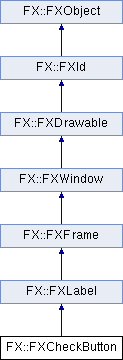
Public Member Functions | |
| long | onPaint (FXObject *, FXSelector, void *) |
| long | onUpdate (FXObject *, FXSelector, void *) |
| long | onEnter (FXObject *, FXSelector, void *) |
| long | onLeave (FXObject *, FXSelector, void *) |
| long | onFocusIn (FXObject *, FXSelector, void *) |
| long | onFocusOut (FXObject *, FXSelector, void *) |
| long | onUngrabbed (FXObject *, FXSelector, void *) |
| long | onLeftBtnPress (FXObject *, FXSelector, void *) |
| long | onLeftBtnRelease (FXObject *, FXSelector, void *) |
| long | onKeyPress (FXObject *, FXSelector, void *) |
| long | onKeyRelease (FXObject *, FXSelector, void *) |
| long | onHotKeyPress (FXObject *, FXSelector, void *) |
| long | onHotKeyRelease (FXObject *, FXSelector, void *) |
| long | onCheck (FXObject *, FXSelector, void *) |
| long | onUncheck (FXObject *, FXSelector, void *) |
| long | onUnknown (FXObject *, FXSelector, void *) |
| long | onCmdSetValue (FXObject *, FXSelector, void *) |
| long | onCmdSetIntValue (FXObject *, FXSelector, void *) |
| long | onCmdGetIntValue (FXObject *, FXSelector, void *) |
| FXCheckButton (FXComposite *p, const FXString &text, FXObject *tgt=nullptr, FXSelector sel=0, FXuint opts=CHECKBUTTON_NORMAL, FXint x=0, FXint y=0, FXint w=0, FXint h=0, FXint pl=DEFAULT_PAD, FXint pr=DEFAULT_PAD, FXint pt=DEFAULT_PAD, FXint pb=DEFAULT_PAD) | |
| Construct new check button. | |
| virtual FXbool | canFocus () const override |
| Returns true because a check button can receive focus. | |
| virtual FXint | getDefaultWidth () override |
| Get default width. | |
| virtual FXint | getDefaultHeight () override |
| Get default height. | |
| void | setCheck (FXuchar state=true, FXbool notify=false) |
| Set check button state (true, false or maybe) | |
| FXuchar | getCheck () const |
| Get check button state (true, false or maybe) | |
| void | setCheckButtonStyle (FXuint style) |
| Change check button style. | |
| FXuint | getCheckButtonStyle () const |
| Return current check button style. | |
| FXColor | getBoxColor () const |
| Get the box background color. | |
| void | setBoxColor (FXColor clr) |
| Set the box background color. | |
| FXColor | getCheckColor () const |
| Get the box check color. | |
| void | setCheckColor (FXColor clr) |
| Set the box check color. | |
| virtual void | save (FXStream &store) const override |
| Save check button to a stream. | |
| virtual void | load (FXStream &store) override |
| Load check button from a stream. | |
 Public Member Functions inherited from FX::FXLabel Public Member Functions inherited from FX::FXLabel | |
| long | onPaint (FXObject *, FXSelector, void *) |
| long | onHotKeyPress (FXObject *, FXSelector, void *) |
| long | onHotKeyRelease (FXObject *, FXSelector, void *) |
| long | onCmdSetValue (FXObject *, FXSelector, void *) |
| long | onCmdSetStringValue (FXObject *, FXSelector, void *) |
| long | onCmdGetStringValue (FXObject *, FXSelector, void *) |
| long | onCmdSetIconValue (FXObject *, FXSelector, void *) |
| long | onCmdGetIconValue (FXObject *, FXSelector, void *) |
| long | onCmdSetHelp (FXObject *, FXSelector, void *) |
| long | onCmdGetHelp (FXObject *, FXSelector, void *) |
| long | onCmdSetTip (FXObject *, FXSelector, void *) |
| long | onCmdGetTip (FXObject *, FXSelector, void *) |
| long | onQueryHelp (FXObject *, FXSelector, void *) |
| long | onQueryTip (FXObject *, FXSelector, void *) |
| FXLabel (FXComposite *p, const FXString &text, FXIcon *ic=0, FXuint opts=LABEL_NORMAL, FXint x=0, FXint y=0, FXint w=0, FXint h=0, FXint pl=DEFAULT_PAD, FXint pr=DEFAULT_PAD, FXint pt=DEFAULT_PAD, FXint pb=DEFAULT_PAD) | |
| Construct label with given text and icon. | |
| virtual void | create () override |
| Create server-side resources. | |
| virtual void | detach () override |
| Detach server-side resources. | |
| virtual void | enable () override |
| Enable the window. | |
| virtual void | disable () override |
| Disable the window. | |
| void | setTextAndHotKey (const FXString &hotkeytext) |
| Change text and hotkey. | |
| void | setText (const FXString &text) |
| Set the text for this label. | |
| FXString | getText () const |
| Get the text for this label. | |
| void | setIcon (FXIcon *ic) |
| Set the icon for this label. | |
| FXIcon * | getIcon () const |
| Get the icon for this label. | |
| void | setFont (FXFont *fnt) |
| Set the text font. | |
| FXFont * | getFont () const |
| Get the text font. | |
| FXColor | getTextColor () const |
| Get the current text color. | |
| void | setTextColor (FXColor clr) |
| Set the current text color. | |
| void | setJustify (FXuint mode) |
| Set the current text-justification mode. | |
| FXuint | getJustify () const |
| Get the current text-justification mode. | |
| void | setIconPosition (FXuint mode) |
| Set the current icon position. | |
| FXuint | getIconPosition () const |
| Get the current icon position. | |
| void | setHelpText (const FXString &text) |
| Set the status line help text for this label. | |
| const FXString & | getHelpText () const |
| Get the status line help text for this label. | |
| void | setTipText (const FXString &text) |
| Set the tool tip message for this label. | |
| const FXString & | getTipText () const |
| Get the tool tip message for this label. | |
| virtual | ~FXLabel () |
| Destructor. | |
| Public Member Functions inherited from FX::FXFrame | |
| long | onPaint (FXObject *, FXSelector, void *) |
| FXFrame (FXComposite *p, FXuint opts=FRAME_NORMAL, FXint x=0, FXint y=0, FXint w=0, FXint h=0, FXint pl=DEFAULT_PAD, FXint pr=DEFAULT_PAD, FXint pt=DEFAULT_PAD, FXint pb=DEFAULT_PAD) | |
| Construct frame window. | |
| void | setFrameStyle (FXuint style) |
| Change frame style. | |
| FXuint | getFrameStyle () const |
| Get current frame style. | |
| FXint | getBorderWidth () const |
| Get border width. | |
| void | setPadTop (FXint pt) |
| Change top padding. | |
| FXint | getPadTop () const |
| Get top interior padding. | |
| void | setPadBottom (FXint pb) |
| Change bottom padding. | |
| FXint | getPadBottom () const |
| Get bottom interior padding. | |
| void | setPadLeft (FXint pl) |
| Change left padding. | |
| FXint | getPadLeft () const |
| Get left interior padding. | |
| void | setPadRight (FXint pr) |
| Change right padding. | |
| FXint | getPadRight () const |
| Get right interior padding. | |
| void | setHiliteColor (FXColor clr) |
| Change highlight color. | |
| FXColor | getHiliteColor () const |
| Get highlight color. | |
| void | setShadowColor (FXColor clr) |
| Change shadow color. | |
| FXColor | getShadowColor () const |
| Get shadow color. | |
| void | setBorderColor (FXColor clr) |
| Change border color. | |
| FXColor | getBorderColor () const |
| Get border color. | |
| void | setBaseColor (FXColor clr) |
| Change base gui color. | |
| FXColor | getBaseColor () const |
| Get base gui color. | |
| Public Member Functions inherited from FX::FXWindow | |
| long | onPaint (FXObject *, FXSelector, void *) |
| long | onMap (FXObject *, FXSelector, void *) |
| long | onUnmap (FXObject *, FXSelector, void *) |
| long | onConfigure (FXObject *, FXSelector, void *) |
| long | onUpdate (FXObject *, FXSelector, void *) |
| long | onMotion (FXObject *, FXSelector, void *) |
| long | onMouseWheel (FXObject *, FXSelector, void *) |
| long | onEnter (FXObject *, FXSelector, void *) |
| long | onLeave (FXObject *, FXSelector, void *) |
| long | onLeftBtnPress (FXObject *, FXSelector, void *) |
| long | onLeftBtnRelease (FXObject *, FXSelector, void *) |
| long | onMiddleBtnPress (FXObject *, FXSelector, void *) |
| long | onMiddleBtnRelease (FXObject *, FXSelector, void *) |
| long | onRightBtnPress (FXObject *, FXSelector, void *) |
| long | onRightBtnRelease (FXObject *, FXSelector, void *) |
| long | onSpaceBallMotion (FXObject *, FXSelector, void *) |
| long | onSpaceBallButtonPress (FXObject *, FXSelector, void *) |
| long | onSpaceBallButtonRelease (FXObject *, FXSelector, void *) |
| long | onBeginDrag (FXObject *, FXSelector, void *) |
| long | onEndDrag (FXObject *, FXSelector, void *) |
| long | onDragged (FXObject *, FXSelector, void *) |
| long | onKeyPress (FXObject *, FXSelector, void *) |
| long | onKeyRelease (FXObject *, FXSelector, void *) |
| long | onUngrabbed (FXObject *, FXSelector, void *) |
| long | onDestroy (FXObject *, FXSelector, void *) |
| long | onFocusSelf (FXObject *, FXSelector, void *) |
| long | onFocusIn (FXObject *, FXSelector, void *) |
| long | onFocusOut (FXObject *, FXSelector, void *) |
| long | onSelectionLost (FXObject *, FXSelector, void *) |
| long | onSelectionGained (FXObject *, FXSelector, void *) |
| long | onSelectionRequest (FXObject *, FXSelector, void *) |
| long | onClipboardLost (FXObject *, FXSelector, void *) |
| long | onClipboardGained (FXObject *, FXSelector, void *) |
| long | onClipboardRequest (FXObject *, FXSelector, void *) |
| long | onDNDEnter (FXObject *, FXSelector, void *) |
| long | onDNDLeave (FXObject *, FXSelector, void *) |
| long | onDNDMotion (FXObject *, FXSelector, void *) |
| long | onDNDDrop (FXObject *, FXSelector, void *) |
| long | onDNDRequest (FXObject *, FXSelector, void *) |
| long | onQueryHelp (FXObject *, FXSelector, void *) |
| long | onQueryTip (FXObject *, FXSelector, void *) |
| long | onCmdShow (FXObject *, FXSelector, void *) |
| long | onCmdHide (FXObject *, FXSelector, void *) |
| long | onUpdToggleShown (FXObject *, FXSelector, void *) |
| long | onCmdToggleShown (FXObject *, FXSelector, void *) |
| long | onCmdRaise (FXObject *, FXSelector, void *) |
| long | onCmdLower (FXObject *, FXSelector, void *) |
| long | onCmdEnable (FXObject *, FXSelector, void *) |
| long | onCmdDisable (FXObject *, FXSelector, void *) |
| long | onUpdToggleEnabled (FXObject *, FXSelector, void *) |
| long | onCmdToggleEnabled (FXObject *, FXSelector, void *) |
| long | onCmdUpdate (FXObject *, FXSelector, void *) |
| long | onUpdYes (FXObject *, FXSelector, void *) |
| long | onCmdDelete (FXObject *, FXSelector, void *) |
| FXWindow (FXComposite *p, FXuint opts=0, FXint x=0, FXint y=0, FXint w=0, FXint h=0) | |
| Constructor. | |
| FXWindow * | getParent () const |
| Return a pointer to the parent window. | |
| FXWindow * | getOwner () const |
| Return a pointer to the owner window. | |
| FXWindow * | getNext () const |
| Return a pointer to the next (sibling) window, if any. | |
| FXWindow * | getPrev () const |
| Return a pointer to the previous (sibling) window , if any. | |
| FXWindow * | getFirst () const |
| Return a pointer to this window's first child window , if any. | |
| FXWindow * | getLast () const |
| Return a pointer to this window's last child window, if any. | |
| FXWindow * | getFocus () const |
| Return a pointer to the currently focused child window. | |
| FXWindow * | getShell () const |
| Return a pointer to the shell window. | |
| FXWindow * | getRoot () const |
| Return a pointer to the root window. | |
| virtual WindowClass | getWindowClass () const |
| Get window class. | |
| void | setKey (FXuint k) |
| Change window key. | |
| FXuint | getKey () const |
| Return window key. | |
| FXWindow * | getChildWithKey (FXuint k) const |
| Return child window with given window key. | |
| void | setTarget (FXObject *t) |
| Set the message target object for this window. | |
| FXObject * | getTarget () const |
| Get the message target object for this window, if any. | |
| void | setSelector (FXSelector sel) |
| Set the message identifier for this window. | |
| FXSelector | getSelector () const |
| Get the message identifier for this window. | |
| FXint | getX () const |
| Get this window's x-coordinate, in the parent's coordinate system. | |
| FXint | getY () const |
| Get this window's y-coordinate, in the parent's coordinate system. | |
| virtual FXint | getWidthForHeight (FXint givenheight) |
| Return width for given height. | |
| virtual FXint | getHeightForWidth (FXint givenwidth) |
| Return height for given width. | |
| void | setX (FXint x) |
| Set this window's x-coordinate, in the parent's coordinate system. | |
| void | setY (FXint y) |
| Set this window's y-coordinate, in the parent's coordinate system. | |
| void | setWidth (FXint w) |
| Set the window width; and flag the widget as being in need of layout by its parent. More... | |
| void | setHeight (FXint h) |
| Set the window height; and flag the widget as being in need of layout by its parent. More... | |
| void | setLayoutHints (FXuint lout) |
| Set layout hints for this window. | |
| FXuint | getLayoutHints () const |
| Get layout hints for this window. | |
| FXAccelTable * | getAccelTable () const |
| Return a pointer to the accelerator table. | |
| void | setAccelTable (FXAccelTable *acceltable) |
| Set the accelerator table. | |
| void | addHotKey (FXHotKey code) |
| Add a hot key. | |
| void | remHotKey (FXHotKey code) |
| Remove a hot key. | |
| void | setHelpTag (const FXString &text) |
| Change help tag for this widget. | |
| const FXString & | getHelpTag () const |
| Get the help tag for this widget. | |
| FXbool | isShell () const |
| Return true if window is a shell window. | |
| FXbool | isOwnerOf (const FXWindow *window) const |
| Return true if specified window is owned by this window. | |
| FXbool | isChildOf (const FXWindow *window) const |
| Return true if specified window is ancestor of this window. | |
| FXbool | containsChild (const FXWindow *child) const |
| Return true if this window contains child in its subtree. | |
| FXWindow * | getChildAt (FXint x, FXint y) const |
| Return the child window at specified coordinates. | |
| FXint | numChildren () const |
| Return the number of child windows for this window. | |
| FXint | indexOfChild (const FXWindow *window) const |
| Return the index (starting from zero) of the specified child window, or -1 if the window is not a child or NULL. | |
| FXWindow * | childAtIndex (FXint index) const |
| Return the child window at specified index, or NULL if the index is negative or out of range. | |
| FXComposeContext * | getComposeContext () const |
| Return compose context. | |
| void | createComposeContext () |
| Create compose context. | |
| void | destroyComposeContext () |
| Destroy compose context. | |
| FXbool | cursorShown () const |
| Is cursor shown. | |
| void | showCursor (FXbool flag=true) |
| Show or hide the cursor. | |
| void | setDefaultCursor (FXCursor *cur) |
| Set the default cursor for this window. | |
| FXCursor * | getDefaultCursor () const |
| Return the default cursor for this window. | |
| void | setDragCursor (FXCursor *cur) |
| Set the drag cursor for this window. | |
| FXCursor * | getDragCursor () const |
| Return the drag cursor for this window. | |
| FXbool | getCursorPosition (FXint &x, FXint &y, FXuint &buttons) const |
| Return the cursor position and mouse button-state. | |
| FXbool | setCursorPosition (FXint x, FXint y) |
| Warp the cursor to the new position. | |
| FXbool | isActive () const |
| Return true if the window is active. | |
| FXbool | hasFocus () const |
| Return true if this window has the focus. | |
| FXbool | inFocusChain () const |
| Return true if this window is in focus chain. | |
| virtual void | setFocus () |
| Move the focus to this window. | |
| virtual void | killFocus () |
| Remove the focus from this window. | |
| FXbool | isDefault () const |
| Return true if this is the default window. | |
| virtual void | setDefault (FXuchar flag=true) |
| This changes the default window which responds to the Return key in a dialog. More... | |
| FXWindow * | findDefault () const |
| Find default window among this window's children. | |
| FXbool | isInitial () const |
| Return true if this is the initial default window. | |
| void | setInitial (FXbool flag=true) |
| Make this window the initial default window. | |
| FXWindow * | findInitial () const |
| Find inital default window among this window's children. | |
| FXbool | isEnabled () const |
| Return true if this window is able to receive mouse and keyboard events. | |
| virtual void | attach (FXID w) |
| Attach foreign window handle to this window. | |
| virtual void | destroy () override |
| Destroy the server-side resources for this window. | |
| virtual void | setShape (const FXRegion ®ion) |
| Set window shape by means of region. | |
| virtual void | setShape (FXBitmap *bitmap) |
| Set window shape by means of bitmap. | |
| virtual void | setShape (FXIcon *icon) |
| Set window shape by means of icon. | |
| virtual void | clearShape () |
| Clear window shape. | |
| virtual void | raise () |
| Raise this window to the top of the stacking order. | |
| virtual void | lower () |
| Lower this window to the bottom of the stacking order. | |
| virtual void | move (FXint x, FXint y) |
| Move the window immediately, in the parent's coordinate system. More... | |
| virtual void | resize (FXint w, FXint h) override |
| Resize the window to the specified width and height immediately, updating the server representation as well, if the window was realized. More... | |
| virtual void | position (FXint x, FXint y, FXint w, FXint h) |
| Move and resize the window immediately, in the parent's coordinate system. More... | |
| virtual void | recalc () |
| Mark this window's layout as dirty for later layout. | |
| virtual void | layout () |
| Perform layout immediately. | |
| void | forceRefresh () |
| Generate a SEL_UPDATE message for the window and its children. | |
| virtual void | reparent (FXWindow *father, FXWindow *other=nullptr) |
| Reparent this window under new father before other. | |
| void | scroll (FXint x, FXint y, FXint w, FXint h, FXint dx, FXint dy) const |
| Scroll rectangle x,y,w,h by a shift of dx,dy. | |
| void | update (FXint x, FXint y, FXint w, FXint h) const |
| Mark the specified rectangle to be repainted later. | |
| void | update () const |
| Mark the entire window to be repainted later. | |
| void | repaint (FXint x, FXint y, FXint w, FXint h) const |
| Process any outstanding repaint messages immediately, for the given rectangle. | |
| void | repaint () const |
| Process any outstanding repaint messages immediately. | |
| FXbool | grabbed () const |
| Return true if the window has been grabbed. | |
| void | grab () |
| Grab the mouse to this window; future mouse events will be reported to this window even while the cursor goes outside of this window. | |
| void | ungrab () |
| Release the mouse grab. | |
| FXbool | grabbedKeyboard () const |
| Return true if active grab is in effect. | |
| void | grabKeyboard () |
| Grab keyboard device. | |
| void | ungrabKeyboard () |
| Ungrab keyboard device. | |
| FXbool | shown () const |
| Return true if the window is shown. | |
| virtual void | show () |
| Show this window. | |
| virtual void | hide () |
| Hide this window. | |
| virtual FXbool | isComposite () const |
| Return true if the window is composite. | |
| FXbool | underCursor () const |
| Return true if the window is under the cursor. | |
| FXbool | hasSelection () const |
| Return true if this window owns the primary selection. | |
| FXbool | acquireSelection (const FXDragType *types, FXuint numtypes) |
| Try to acquire the primary selection, given a list of drag types. | |
| FXbool | releaseSelection () |
| Release the primary selection. | |
| FXbool | hasClipboard () const |
| Return true if this window owns the clipboard. | |
| FXbool | acquireClipboard (const FXDragType *types, FXuint numtypes) |
| Try to acquire the clipboard, given a list of drag types. | |
| FXbool | releaseClipboard () |
| Release the clipboard. | |
| FXbool | isDropEnabled () const |
| Return true if this window is able to receive drops. | |
| virtual void | dropEnable () |
| Enable this window to receive drops. | |
| virtual void | dropDisable () |
| Disable this window from receiving drops. | |
| FXbool | isDragging () const |
| Return true if a drag operaion has been initiated from this window. | |
| FXbool | beginDrag (const FXDragType *types, FXuint numtypes) |
| Initiate a drag operation with a list of previously registered drag types. | |
| FXbool | handleDrag (FXint x, FXint y, FXDragAction action=DRAG_COPY) |
| When dragging, inform the drop-target of the new position and the drag action. | |
| FXDragAction | endDrag (FXbool drop=true) |
| Terminate the drag operation with or without actually dropping the data Returns the action performed by the target. | |
| FXbool | isDropTarget () const |
| Return true if this window is the target of a drop. | |
| void | setDragRectangle (FXint x, FXint y, FXint w, FXint h, FXbool wantupdates=true) const |
| When being dragged over, indicate that no further SEL_DND_MOTION messages are required while the cursor is inside the given rectangle. | |
| void | clearDragRectangle () const |
| When being dragged over, indicate we want to receive SEL_DND_MOTION messages every time the cursor moves. | |
| void | acceptDrop (FXDragAction action=DRAG_ACCEPT) const |
| When being dragged over, indicate acceptance or rejection of the dragged data. | |
| FXDragAction | didAccept () const |
| The target accepted our drop. | |
| void | dropFinished (FXDragAction action=DRAG_REJECT) const |
| Sent by the drop target in response to SEL_DND_DROP. More... | |
| FXbool | inquireDNDTypes (FXDNDOrigin origin, FXDragType *&types, FXuint &numtypes) const |
| When being dragged over, inquire the drag types which are being offered. | |
| FXbool | offeredDNDType (FXDNDOrigin origin, FXDragType type) const |
| When being dragged over, return true if we are offered the given drag type. | |
| FXDragAction | inquireDNDAction () const |
| When being dragged over, return the drag action. | |
| FXbool | setDNDData (FXDNDOrigin origin, FXDragType type, FXuchar *data, FXuint size) const |
| Set DND data; the array must be allocated with allocElms() and ownership is transferred to the system. | |
| FXbool | setDNDData (FXDNDOrigin origin, FXDragType type, const FXString &string) const |
| Set DND data from string value. | |
| FXbool | getDNDData (FXDNDOrigin origin, FXDragType type, FXuchar *&data, FXuint &size) const |
| Get DND data; the caller becomes the owner of the array and must free it with freeElms(). | |
| FXbool | getDNDData (FXDNDOrigin origin, FXDragType type, FXString &string) const |
| Get DND data into string value. | |
| virtual FXbool | contains (FXint parentx, FXint parenty) const |
| Return true if window logically contains the given point. | |
| void | translateCoordinatesFrom (FXint &tox, FXint &toy, const FXWindow *fromwindow, FXint fromx, FXint fromy) const |
| Translate coordinates from fromwindow's coordinate space to this window's coordinate space. | |
| void | translateCoordinatesTo (FXint &tox, FXint &toy, const FXWindow *towindow, FXint fromx, FXint fromy) const |
| Translate coordinates from this window's coordinate space to towindow's coordinate space. | |
| void | setBackColor (FXColor clr) |
| Set window background color. | |
| FXColor | getBackColor () const |
| Get background color. | |
| virtual FXbool | doesSaveUnder () const |
| Does save-unders. | |
| virtual const FXchar * | tr (const FXchar *text, const FXchar *hint=nullptr, FXint count=-1) const FX_FORMAT(2) |
| Translate message for localization; using the current FXTranslator, an attempt is made to translate the given message into the current language. More... | |
| virtual | ~FXWindow () |
| Destroy window. | |
| Public Member Functions inherited from FX::FXDrawable | |
| FXVisual * | getVisual () const |
| Get the visual. | |
| FXint | getWidth () const |
| Width of drawable. | |
| FXint | getHeight () const |
| Height of drawable. | |
| void | setVisual (FXVisual *vis) |
| Change visual. | |
| virtual | ~FXDrawable () |
| Cleanup. | |
| Public Member Functions inherited from FX::FXId | |
| FXApp * | getApp () const |
| Get application. | |
| FXID | id () const |
| Get XID handle. | |
| void | setUserData (FXptr ptr) |
| Set user data pointer. | |
| FXptr | getUserData () const |
| Get user data pointer. | |
| virtual | ~FXId () |
| Destructor. | |
| Public Member Functions inherited from FX::FXObject | |
| const FXchar * | getClassName () const |
| Get class name of some object. | |
| FXbool | isMemberOf (const FXMetaClass *metaclass) const |
| Check if object is member of metaclass. | |
| virtual long | tryHandle (FXObject *sender, FXSelector sel, void *ptr) |
| Try handle message safely, catching certain exceptions. | |
| virtual long | onDefault (FXObject *, FXSelector, void *) |
| Called for unhandled messages. | |
| virtual | ~FXObject () |
| Virtual destructor. | |
Protected Attributes | |
| FXColor | checkColor |
| FXColor | boxColor |
| FXuchar | check |
| FXuchar | oldcheck |
| Protected Attributes inherited from FX::FXLabel | |
| FXString | label |
| FXIcon * | icon |
| FXFont * | font |
| FXString | help |
| FXString | tip |
| FXColor | textColor |
| FXHotKey | hotkey |
| FXint | hotoff |
| Protected Attributes inherited from FX::FXFrame | |
| FXColor | baseColor |
| FXColor | hiliteColor |
| FXColor | shadowColor |
| FXColor | borderColor |
| FXint | padtop |
| FXint | padbottom |
| FXint | padleft |
| FXint | padright |
| FXint | border |
| Protected Attributes inherited from FX::FXWindow | |
| FXComposeContext * | composeContext |
| FXCursor * | defaultCursor |
| FXCursor * | dragCursor |
| FXAccelTable * | accelTable |
| FXObject * | target |
| FXSelector | message |
| FXint | xpos |
| FXint | ypos |
| FXColor | backColor |
| FXString | tag |
| FXuint | flags |
| FXuint | options |
| Protected Attributes inherited from FX::FXDrawable | |
| FXVisual * | visual |
| FXint | width |
| FXint | height |
| Protected Attributes inherited from FX::FXId | |
| FXID | xid |
Additional Inherited Members | |
| Public Types inherited from FX::FXWindow | |
| enum | WindowClass { ClassNormal, ClassGraphic, ClassSpecial, ClassRoot, ClassShell, ClassPopup, ClassToolTip, ClassMain, ClassDialog, ClassToolBar, ClassSplash, ClassNotify, ClassPanel, ClassDesktop } |
| Window classes. More... | |
| enum | { ID_NONE, ID_HIDE, ID_SHOW, ID_TOGGLESHOWN, ID_LOWER, ID_RAISE, ID_DELETE, ID_DISABLE, ID_ENABLE, ID_TOGGLEENABLED, ID_UNCHECK, ID_CHECK, ID_UNKNOWN, ID_UPDATE, ID_TIPTIMER, ID_SETVALUE, ID_SETINTVALUE, ID_SETLONGVALUE, ID_SETREALVALUE, ID_SETSTRINGVALUE, ID_SETICONVALUE, ID_SETINTRANGE, ID_SETREALRANGE, ID_GETINTVALUE, ID_GETLONGVALUE, ID_GETREALVALUE, ID_GETSTRINGVALUE, ID_GETICONVALUE, ID_GETINTRANGE, ID_GETREALRANGE, ID_SETHELPSTRING, ID_GETHELPSTRING, ID_SETTIPSTRING, ID_GETTIPSTRING, ID_QUERY_MENU, ID_HOTKEY, ID_ACCEL, ID_UNPOST, ID_POST, ID_MDI_TILEHORIZONTAL, ID_MDI_TILEVERTICAL, ID_MDI_CASCADE, ID_MDI_MAXIMIZE, ID_MDI_MINIMIZE, ID_MDI_RESTORE, ID_MDI_CLOSE, ID_MDI_WINDOW, ID_MDI_MENUWINDOW, ID_MDI_MENUMINIMIZE, ID_MDI_MENURESTORE, ID_MDI_MENUCLOSE, ID_MDI_NEXT, ID_MDI_PREV, ID_LAST } |
| Static Public Member Functions inherited from FX::FXWindow | |
| static FXWindow * | commonAncestor (FXWindow *a, FXWindow *b) |
| Return the common ancestor of window a and window b. | |
| static FXbool | before (const FXWindow *a, const FXWindow *b) |
| Return true if sibling a <= sibling b in list. | |
| static FXbool | after (const FXWindow *a, const FXWindow *b) |
| Return true if sibling a >= sibling b in list. | |
| Static Public Attributes inherited from FX::FXWindow | |
| static FXDragType | octetType |
| static FXDragType | deleteType |
| static FXDragType | textType |
| static FXDragType | colorType |
| static FXDragType | urilistType |
| static FXDragType | utf8Type |
| static FXDragType | utf16Type |
| static FXDragType | actionType |
| static const FXDragType | stringType |
| static const FXDragType | imageType |
| static const FXchar | octetTypeName [] |
| static const FXchar | deleteTypeName [] |
| static const FXchar | textTypeName [] |
| static const FXchar | colorTypeName [] |
| static const FXchar | urilistTypeName [] |
| static const FXchar | utf8TypeName [] |
| static const FXchar | utf16TypeName [] |
| static const FXchar | actionTypeName [] |
| Protected Types inherited from FX::FXWindow | |
| enum | { FLAG_SHOWN = 0x00000001, FLAG_ENABLED = 0x00000002, FLAG_UPDATE = 0x00000004, FLAG_DROPTARGET = 0x00000008, FLAG_FOCUSED = 0x00000010, FLAG_DIRTY = 0x00000020, FLAG_RECALC = 0x00000040, FLAG_TIP = 0x00000080, FLAG_HELP = 0x00000100, FLAG_DEFAULT = 0x00000200, FLAG_INITIAL = 0x00000400, FLAG_SHELL = 0x00000800, FLAG_ACTIVE = 0x00001000, FLAG_PRESSED = 0x00002000, FLAG_KEY = 0x00004000, FLAG_CARET = 0x00008000, FLAG_CHANGED = 0x00010000, FLAG_LASSO = 0x00020000, FLAG_TRYDRAG = 0x00040000, FLAG_DODRAG = 0x00080000, FLAG_SCROLLINSIDE = 0x00100000, FLAG_SCROLLING = 0x00200000, FLAG_OWNED = 0x00400000, FLAG_CURSOR = 0x00800000 } |
| Protected Member Functions inherited from FX::FXLabel | |
| FXint | labelHeight (const FXString &text) const |
| FXint | labelWidth (const FXString &text) const |
| void | drawLabel (FXDCWindow &dc, const FXString &text, FXint hot, FXint tx, FXint ty, FXint tw, FXint th) |
| void | just_x (FXint &tx, FXint &ix, FXint tw, FXint iw) |
| void | just_y (FXint &ty, FXint &iy, FXint th, FXint ih) |
| Protected Member Functions inherited from FX::FXFrame | |
| void | drawBorderRectangle (FXDCWindow &dc, FXint x, FXint y, FXint w, FXint h) |
| void | drawRaisedRectangle (FXDCWindow &dc, FXint x, FXint y, FXint w, FXint h) |
| void | drawSunkenRectangle (FXDCWindow &dc, FXint x, FXint y, FXint w, FXint h) |
| void | drawRidgeRectangle (FXDCWindow &dc, FXint x, FXint y, FXint w, FXint h) |
| void | drawGrooveRectangle (FXDCWindow &dc, FXint x, FXint y, FXint w, FXint h) |
| void | drawDoubleRaisedRectangle (FXDCWindow &dc, FXint x, FXint y, FXint w, FXint h) |
| void | drawDoubleSunkenRectangle (FXDCWindow &dc, FXint x, FXint y, FXint w, FXint h) |
| void | drawFrame (FXDCWindow &dc, FXint x, FXint y, FXint w, FXint h) |
| Protected Member Functions inherited from FX::FXWindow | |
| virtual FXbool | doesOverrideRedirect () const |
| void | addColormapWindows () |
| void | remColormapWindows () |
| FXWindow (FXApp *a, FXVisual *vis) | |
| FXWindow (FXApp *a, FXWindow *own, FXuint opts, FXint x, FXint y, FXint w, FXint h) | |
| Protected Member Functions inherited from FX::FXDrawable | |
| FXDrawable (FXApp *a, FXint w, FXint h) | |
| Protected Member Functions inherited from FX::FXId | |
| FXId (FXApp *a) | |
A Check Button is a tri-state button.
Normally, it is either true or false, and toggles between true or false whenever it is pressed. A third state (maybe) may be set to indicate that no selection has been made yet by the user, or that the state is ambiguous. When pressed, the Check Button sends a SEL_COMMAND to its target, and the message data represents the state of the check button. The option CHECKBUTTON_AUTOGRAY (CHECKBUTTON_AUTOHIDE) causes the button to be grayed out (hidden) if its handler does not respond to the SEL_UPDATE message. With the CHECKBUTTON_PLUS option, the Check Button will draw a + or - sign instead of a check. You can use this to make collapsable panels, by hooking up a Check Button to a layout manager via the ID_TOGGLE_SHOWN message. This will give a similar visual element as collapsing folders in a Tree List.
|
Copyright © 1997-2026 Jeroen van der Zijp
|